Free. Browser-Based. No Signup
CuePrompter Alternative
CuePrompter has been scrolling scripts in a browser since before most of us had a YouTube channel, and it still works. If you want the same free, no-signup idea with saved scripts, finer speed control, and an interface built for a modern screen, this is that.
Free. No signup. Your script loads straight into the teleprompter.
First, the Fair Version
CuePrompter is a genuinely useful tool and it has earned its place. It is free, it needs no account, it runs in any browser, and it has been reliably doing that since the mid-2000s. If all you need is text moving up a screen, it will not let you down.
We are obviously not neutral here. But both tools are free, so nothing stops you opening them in two tabs and reading the same paragraph through each one. That is a better test than any comparison table, including ours.
The reasons people go looking for an alternative are usually practical rather than dramatic: the interface feels of its era, there is nowhere to keep more than one script, and the speed and size controls are coarser than they want on a large display.
LilPrompter vs CuePrompter
| LilPrompter | CuePrompter | |
|---|---|---|
| Price | Free, all features | Free, with a paid tier |
| Signup | None | None |
| Runs in the browser | Yes | Yes |
| Mirror mode | Free | Yes |
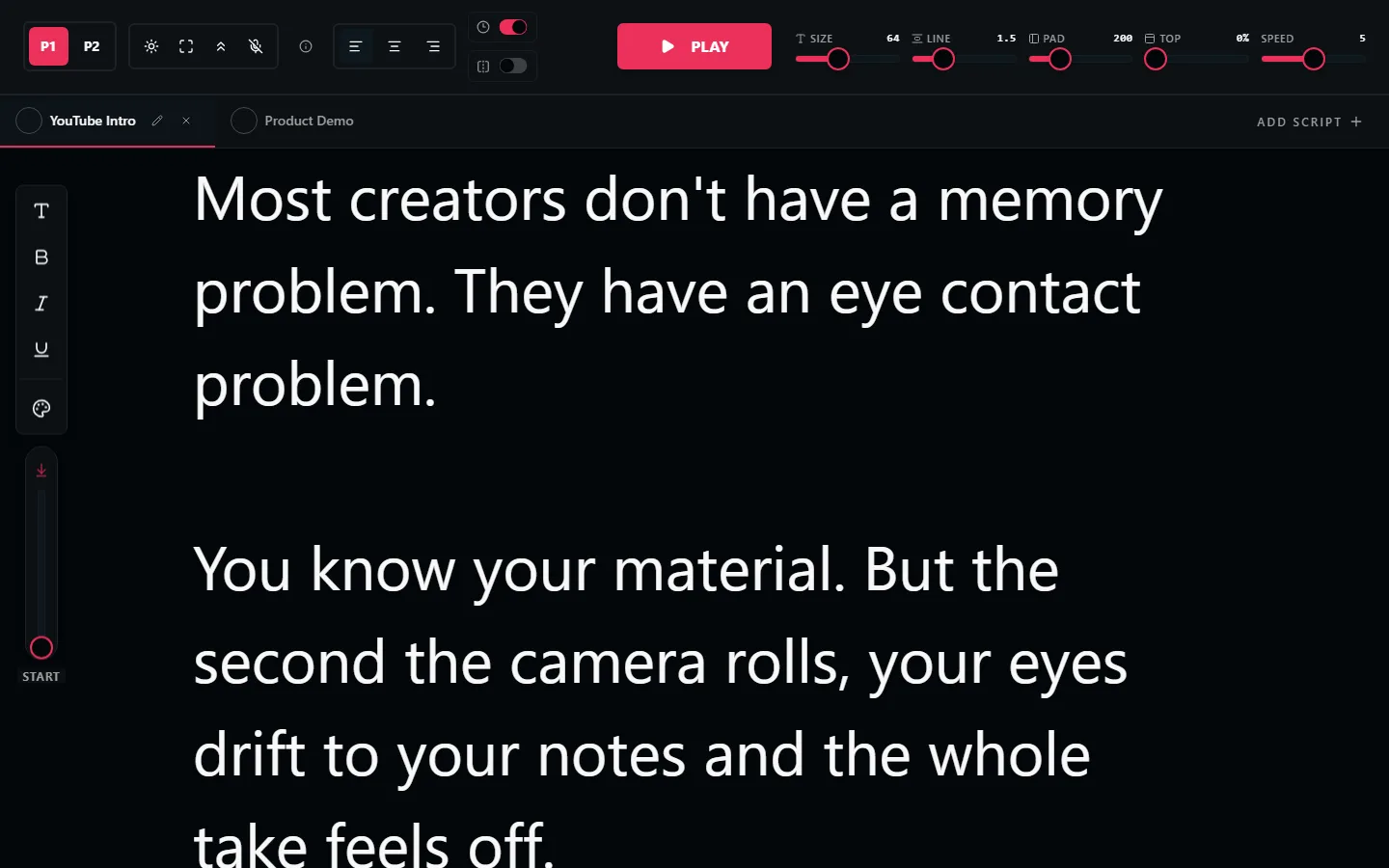
| Multiple scripts in tabs | Yes | No |
| Scripts saved between sessions | Yes, in your browser | No |
| Font size range | 24px to 128px | Preset sizes |
| Keyboard speed control | Yes | Yes |
| Voice commands | Yes | No |
| Interface | Dark, built for on-camera work | Classic, plain |
| Watermark on your video | None | None |
Both tools change over time. Check CuePrompter directly before making a decision that matters to you.
Reasons People Move Over
They film more than one thing per session
An intro, a sponsor read, and an outro are three scripts. Tabs mean you stop pasting text back and forth between takes.
The script is still there tomorrow
Scripts persist in your browser between sessions. Close the tab, come back next week, your text is where you left it.
They want finer speed control
A slider plus keyboard nudges mid-read, rather than stepping between preset speeds and hoping one of them matches how you talk.
The screen is bigger than it used to be
Text scales to 128px, which matters when the prompter is a monitor across the room rather than a laptop at arm's length.
They are recording, not just reading
A dark interface throws less light back at your face and shows up less in glasses and glossy surfaces on camera.
When You Should Just Stay Put
If you open a prompter twice a year, paste one paragraph, read it, and close the tab, none of the above matters. Script tabs solve a problem you do not have. Use what you know.
The same goes for muscle memory. If you have been driving CuePrompter's controls for years and they are automatic to you, switching costs you more than it gains. That is a real cost, and a comparison table will never show it.
Where it does start to pay off is volume. Once you are filming weekly, juggling several scripts, and caring about how your eye-line looks, the small friction adds up and the newer tool earns the swap.
CuePrompter Alternative FAQ
Is LilPrompter a free CuePrompter alternative?
Yes. Both are free browser teleprompters with no signup, so you can compare them in a couple of minutes at no cost. The differences are in the interface, script management, and how much control you get over scroll speed and font size.
What is wrong with CuePrompter?
Nothing is broken about it. It has been running for two decades and it does the core job. The usual reasons people look for an alternative are the dated interface, the lack of saved scripts or tabs, and wanting finer control over speed and text size on a modern screen.
Do I have to create an account to switch?
No. LilPrompter has no accounts at all. Open the page, paste your script, and read. Scripts save in your own browser rather than on a server.
Does LilPrompter have mirror mode like CuePrompter?
Yes, and it is free. One click flips the text horizontally so it reads correctly through the beam-splitter glass on a hardware teleprompter rig.
Can I keep more than one script open?
Yes. Scripts live in tabs, so you can keep an intro, a main read, and an outro side by side and switch between takes without pasting anything again.
Which one should I actually use?
Try both, they are free. If you want the simplest possible page and nothing else, CuePrompter is fine. If you want script tabs, a modern speed slider, larger text, and a dark interface built for on-camera work, that is what LilPrompter is for.
Open It and Compare
Free, no signup, nothing to install. Read a paragraph through both and pick the one you prefer.
Open LilPrompter